How to calculate overtime hours starts with totaling eligible worked time in the correct workweek, then subtracting the regular-hours threshold that applies to the employee. Calculate overtime hours before calculating overtime pay, because hours and pay are separate steps. The applicable workweek, schedule and local rules determine which threshold and exceptions you should use. For a UAE calculation, enter the applicable hours and pay details in the UAE overtime calculator.
What Counts as Overtime Hours?
Overtime hours are hours worked beyond an employee’s regular working hours under the rules that apply to the job. Overtime pay is the money calculated from those hours and an applicable pay rate, so a timesheet can show overtime hours before payroll determines the payment.
Start by identifying three inputs: the employee’s regular schedule, the recurring workweek and the relevant jurisdiction or workplace policy. A workweek is a fixed, regularly recurring period used to group hours; under the US Fair Labor Standards Act, or FLSA, it is 168 hours, or seven consecutive 24-hour periods, and may begin on any day.
A weekend, public holiday or long shift is not automatically overtime in every jurisdiction. Some rules use weekly thresholds, while others may address daily hours, rest periods, specific sectors or collective agreements. Label legal examples by jurisdiction instead of treating the US FLSA 40-hour rule as a worldwide standard.
For an international team, record the location, employee category, policy version and workweek start before reviewing hours. GetAttendances supports attendance workflows, reports and configurable policies for organizations managing attendance across locations, but the applicable legal and payroll review remains specific to the organization.
The Basic Overtime-Hours Formula
The basic formula is overtime hours = the greater of zero or total worked hours minus the applicable regular-hours threshold. Apply the formula to each correct workweek or other legally required period before applying an overtime pay rate.
Use neutral variables so the method can fit different rules: OT = max(0, W − R). In this formula, W means total hours actually worked in the relevant period, R means the regular-hours threshold, and OT means overtime hours.
For example, if a policy threshold is 40 hours and an employee worked 46 hours in one workweek, the calculation is 46 − 40 = 6 overtime hours. If the employee worked 37 hours, the result is max(0, 37 − 40) = 0 overtime hours.
The threshold in that example is an input, not a universal rule. Under the US FLSA, covered nonexempt employees generally receive overtime pay for hours worked over 40 in a workweek at no less than one and one-half times the regular rate. Other jurisdictions, contracts and employee categories may use different rules.
Separate Worked Time From Paid Time
Only include time that the applicable rule treats as worked time. Paid leave, holidays, breaks, training, travel or on-call periods may be treated differently depending on the jurisdiction, policy and facts, so do not add them automatically to worked hours.
An attendance record should preserve the calculation trail: clock-in, clock-out, break adjustment, worked hours, workweek, threshold and reviewed overtime. That trail lets an HR or payroll reviewer see how the final number was reached rather than relying on a single total.
How to Calculate Overtime From Clock-In and Timesheet Records
Calculate overtime from clock-in and clock-out records by converting each shift into worked hours, grouping shifts inside the correct workweek, totaling the hours and applying the threshold. Review the source records before sending the result to payroll.
- Collect the source records. Gather clock-in and clock-out times, break records, shift dates, employee names, locations and documented edits. Records from a time clock, attendance workflow or spreadsheet should identify the same employee and shift.
- Calculate each shift. Subtract the start time and unpaid break time from the end time. For an illustrative shift from 08:30 to 17:00 with a 30-minute unpaid break, worked time is 8 hours.
- Handle overnight shifts carefully. A shift starting at 22:00 and ending at 06:00 crosses midnight, so assign the hours according to the organization’s rule and the correct workday or workweek. Do not treat the end time as earlier than the start time without an overnight indicator.
- Group by the recurring workweek. Sort the records by employee and workweek, not simply by calendar month or payroll export. Under the FLSA, averaging hours across two or more workweeks is not permitted, and other jurisdictions may have their own grouping rules.
- Total worked hours. Add the eligible worked hours for each employee in that workweek. Keep reviewed corrections and the original record visible when the system or policy requires a review trail.
- Apply the threshold. Subtract the applicable regular-hours threshold from the weekly total, with a minimum result of zero. Then send the overtime-hours result and supporting records for the required payroll or legal review.
Worked Attendance-Record Example
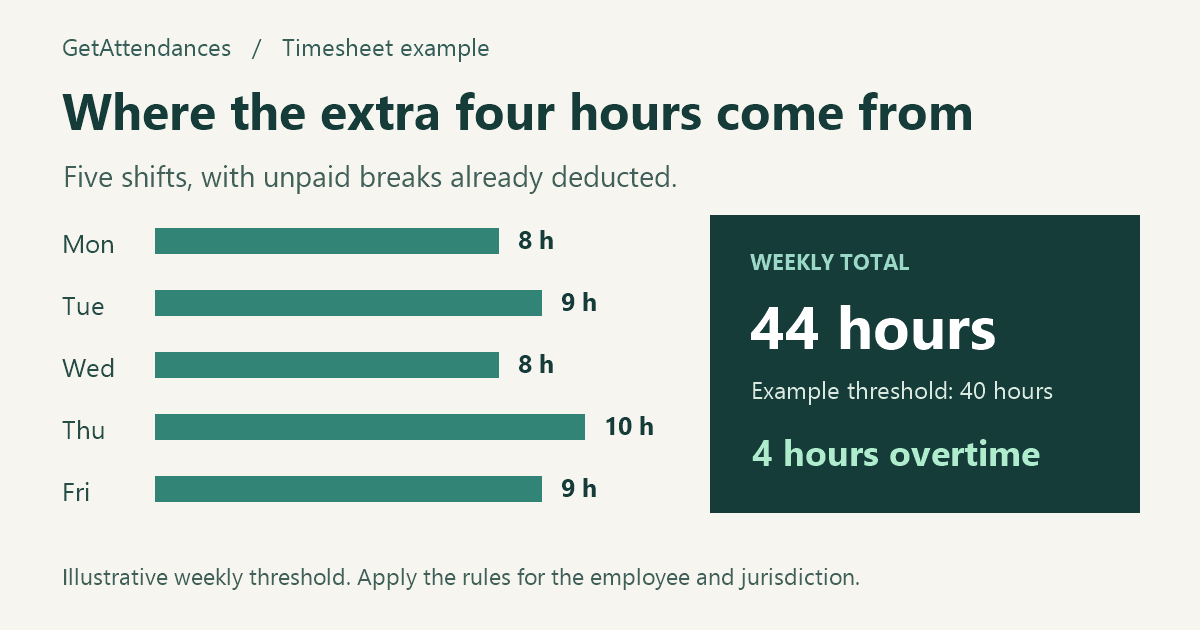
Consider a sample employee with five recorded shifts of 8, 9, 8, 10 and 9 worked hours in one defined workweek. The total is 44 hours. If the applicable threshold for that example is 40 hours, the overtime result is 44 − 40 = 4 hours.
The sample does not decide whether all 44 hours are legally compensable. A manager should still check breaks, time spent travelling, leave, shift changes, documented review and the employee’s classification before approving the payroll handoff.
How to Calculate Overtime Hours in Excel
Calculate overtime hours in Excel by keeping one row per shift or time record, summing worked hours by employee and workweek, and subtracting a threshold stored in a separate cell. The spreadsheet should expose missing, duplicated and inconsistent records before anyone relies on the result.
A simple structure uses these columns: Date, Employee, Workweek, Clock-in, Clock-out, Break hours, Worked hours, Regular hours and Overtime hours. Add Location, Review status and Notes when teams work across branches or use edited records.
For a same-day shift, a worked-hours formula can follow the pattern =(Clock-out − Clock-in) × 24 − Break hours. For the overtime column, use the pattern =MAX(0, Total worked hours − Regular-hours threshold), with the threshold supplied by the applicable policy rather than hard-coded as a universal number.
Use a pivot table or equivalent summary to group total worked hours by employee and workweek. A date such as 14 March does not by itself define the overtime period; the workweek start and the employee’s applicable rule must be recorded in the workbook.
Review the Spreadsheet Before Approval
- Find blank clock-in, clock-out or employee fields.
- Check for duplicate rows created by repeated imports.
- Flag clock-out times earlier than clock-in times unless the shift crosses midnight.
- Compare unusually long shifts with schedules, documented reviews and break records.
- Confirm that every row belongs to the correct employee, location and workweek.
- Keep the source export and the reviewed workbook together for the payroll handoff.
Excel can be useful for a small team doing occasional checks, but repeated manual imports increase the number of places where a date, break or workweek can be misclassified. An attendance system can provide a more consistent source record when clock-ins, shifts and reviews occur every day.
What Changes When Pay Rates or Compensation Differ?
Different pay rates change the overtime-pay calculation, not the first calculation of overtime hours. Calculate eligible hours from attendance records first, then ask payroll or a qualified adviser how salary, rates, bonuses, commissions and other compensation affect the applicable regular rate.
Employees who work at two or more straight-time rates in one workweek may require a weighted-average regular rate. Under the US FLSA, the regular rate is generally based on total pay for employment, subject to statutory exclusions, divided by total hours actually worked; the FLSA also describes a weighted average when multiple straight-time rates apply.
Piece-rate work, commissions, salary arrangements and nondiscretionary bonuses can make the pay calculation more complex. A simple formula such as overtime hours multiplied by one hourly rate may be incomplete when compensation includes several pay bases or when local rules use a different method.
Use a payroll or legal review when an employee changes rates during the workweek, receives a qualifying bonus, works across jurisdictions, has a salary arrangement or falls under a special sector rule. Do not force a spreadsheet calculation to answer a question that depends on facts outside the attendance record.
Manual Timesheets vs Attendance Records: Comparison Table
Manual spreadsheets suit a small team performing occasional checks, while attendance-system records are better suited to recurring, distributed attendance data across shifts, branches or mobile teams. The right choice depends on how often records are captured, how many locations are involved and how much review evidence payroll requires.
| Comparison Point | Manual Timesheets | Attendance-System Records |
|---|---|---|
| Source data | Employees or managers enter clock-in, clock-out, breaks and corrections manually. | Records can be collected through attendance workflows such as clock-ins and documented attendance entries. |
| Review trail | Evidence depends on saved versions, notes, documented review and careful spreadsheet control. | Attendance reports, configurable policies and a documented review process can make records more visible for review. |
| Shift coverage | Overnight, split and changing shifts require manual structure and checks. | Shift and attendance workflows can organize recurring records across employees and locations. |
| Multi-location visibility | Separate files or tabs can make branch and mobile-team comparisons harder to maintain. | A centralized attendance view can help managers review teams across branches and locations. |
| Payroll handoff | A manager exports or copies totals and attaches supporting records. | Attendance reports and organized records can support a clearer handoff for review. |
Before approving overtime, retain the workweek definition, source clock-in and clock-out records, break treatment, edits, employee or manager review, overtime-hours calculation and pay-rate inputs. An attendance report should support the result without being treated as proof that a particular legal rule applies.
GetAttendances provides attendance, shift, leave and reporting workflows with visibility for organizations that need to manage everyday attendance across locations. The setup should be matched to the organization’s policies and working routines.
Final Overtime Check Before Payroll
Before payroll, confirm the workweek, eligible worked hours, overtime threshold, review status and pay-rate inputs as separate checks. A consistent attendance workflow reduces repeated manual calculations by keeping clock-ins, shifts, edits and reports in an organized process.
- Confirm the employee’s applicable schedule, classification, location and recurring workweek.
- Check that every clock-in, clock-out, break and overnight shift is complete and assigned correctly.
- Recalculate total worked hours inside each workweek without averaging unrelated periods.
- Apply the correct overtime-hours threshold and record the formula used.
- Separate overtime hours from overtime pay and review rates, salary, bonuses, commissions or piece-rate inputs.
- Complete the required review and retain the source records, edits and attendance report.
For occasional checks, a controlled timesheet may be enough. For recurring attendance across retail and hospitality sites, construction teams, healthcare shifts, offices or mobile employees, discuss a setup that gives HR and operations clearer attendance visibility.
Book a free demo or talk to the GetAttendances team about the right setup for your people, locations and devices. Contact sales@getattendances.com to discuss the workflow without assuming that one attendance process fits every organization.
Frequently asked questions
What is the basic formula for calculating overtime hours?
The basic formula is overtime hours = max(0, total eligible worked hours in the applicable period − regular-hours threshold). Apply it to the correct workweek or other required period before calculating overtime pay.
What is the difference between overtime hours and overtime pay?
Overtime hours are the hours worked beyond the applicable regular-hours threshold. Overtime pay is the compensation calculated from those hours and the relevant pay-rate rules, which may be more complex when rates, salary, bonuses or commissions differ.
Are overtime hours calculated by day or by workweek?
The answer depends on the applicable jurisdiction, employment rule and workplace policy. Group records using the required period; for example, the US FLSA uses a fixed seven-day workweek for its general overtime rule and does not permit averaging hours across two workweeks.
Can overtime hours be averaged across two workweeks?
Do not average hours across two workweeks unless the applicable rule specifically allows the method. Under the US FLSA, averaging hours over two or more weeks is not permitted, so each workweek must be checked separately.
How do I calculate overtime hours in Excel?
Use one row per shift, calculate worked hours from clock-in, clock-out and break data, group totals by employee and workweek, then use a formula such as MAX(0, total worked hours − threshold). Review blank, duplicate, overnight and inconsistent records before approving the result.